Teleprompter: Script Overlay brings on-screen scripts to Android cameras
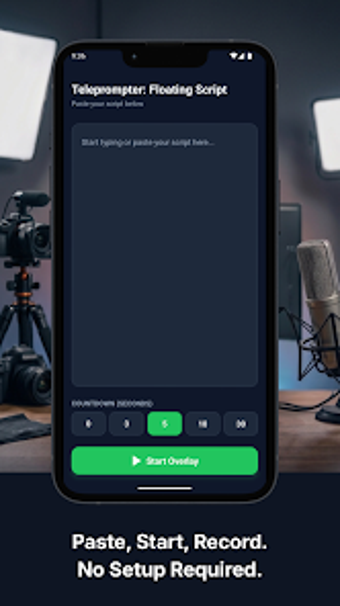
Teleprompter: Script Overlay, from BlushBit Technologies, is an Android tool designed to help speakers and creators deliver lines without memorizing them. The app places a persistent script layer over other mobile apps so users can read while recording or video calling. It emphasizes instant setup, text visibility controls, and local script storage. Creators, business presenters, and educators benefit from on-device script management and adjustable on-screen text during live recording sessions.
What is the app and how does it fit a recording workflow?
The app functions as a floating teleprompter overlay that runs above any camera or streaming application, which keeps the script visible while using TikTok, Instagram, or video conferencing tools. That overlay approach fits workflows where maintaining eye contact with the camera matters, because the script remains on top of third-party apps instead of forcing an app switch or external device.
How does it handle script control and readability during a take?
Users can adjust scroll speed, font size, text color, and background transparency in real time, which lets presenters match pacing and lighting without leaving the recording app. The tool offers a Focus Mode that highlights the active line, and a Mirror Mode that flips text for physical teleprompter rigs; those options support both handheld and pro glass setups.
Is the interface accessible for creators and non-technical users?
The design emphasizes a low-friction start: scripts paste directly into the app and auto-save, reducing setup steps before a shoot. Script management supports creation, editing, and unlimited storage on-device, so producers can organize multiple takes without account registration or cloud syncing, which keeps setup initial friction minimal for solo creators.
What performance and compatibility should professionals expect?
The app targets high-frame-rate scrolling, optimized for 60 frames per second to reduce visible lag during recording. It is built for Android devices that meet current store requirements, and the overlay model enables compatibility with most mobile camera and conferencing apps, allowing the script layer to remain visible while other apps run in the foreground.
Who benefits and when to choose this teleprompter
Teleprompter: Script Overlay is a practical option for mobile creators and presenters who need an on-screen script while using camera or conferencing apps. It suits users who prefer local script storage and in-session text control, but it is less relevant for setups that require cloud collaboration or desktop teleprompter hardware. For solo content production on Android, it performs reliably as an on-device prompting tool.